Setting Property Preferences That Save Time
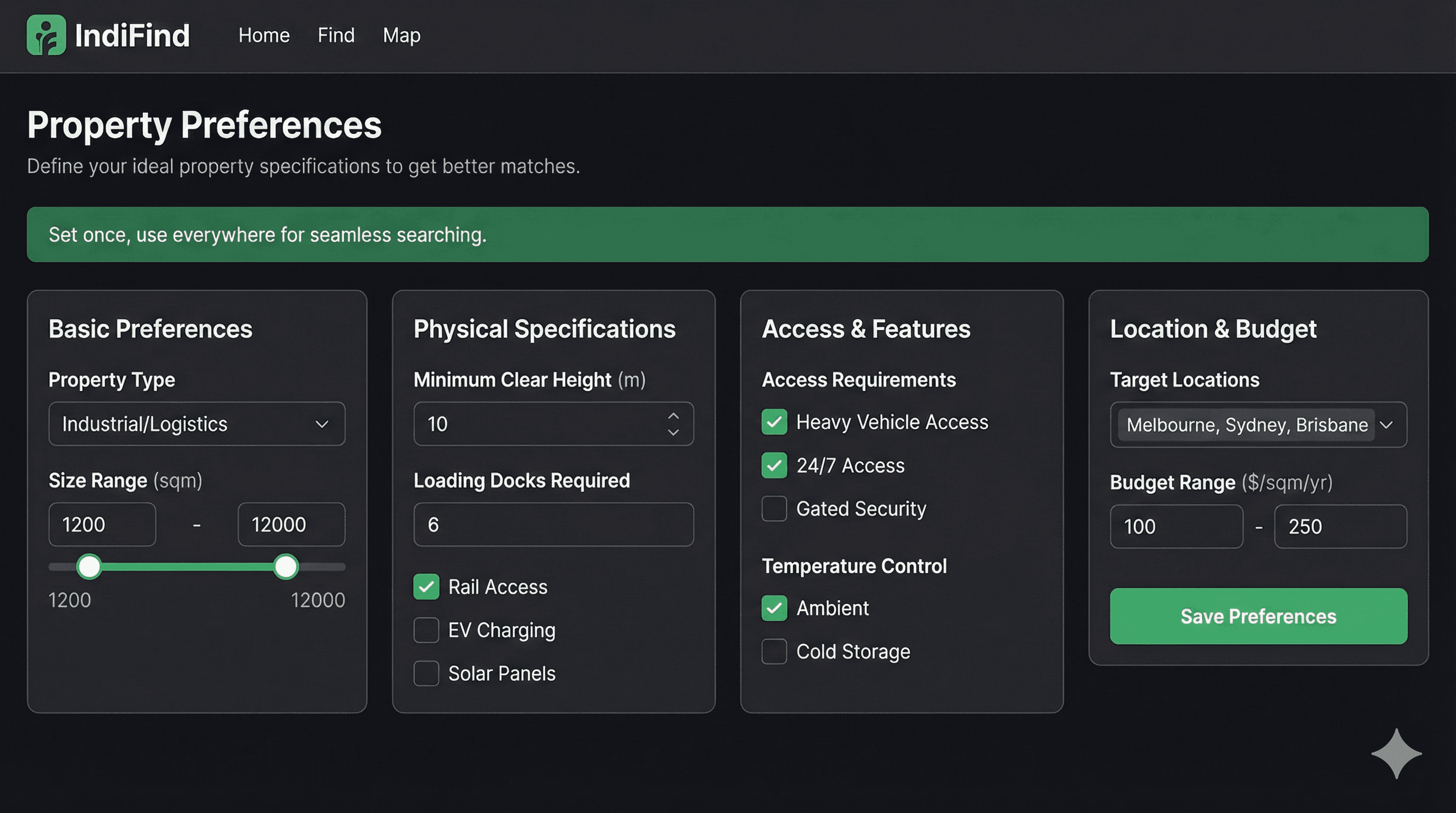
Re-entering the same filters for every property search wastes time. You know what you need. Why type it 50 times?
IndiFind solves this with one-time preference settings. Set your requirements once. We match everything automatically.
The Problem with Manual Filtering
Most property seekers waste 10 minutes per search re-entering filters:
- Property type: Warehouse
- Size: 5,000-10,000 sqm
- Location: Within 50km of city center
- Budget: €50,000-€100,000/month
- Access: 24/7 required
- Dock doors: Minimum 10
- Ceiling height: Minimum 12m
You enter this. Every. Single. Search.
Time wasted: 10 minutes × 5 searches/month = 50 minutes/month
The IndiFind Solution
Set your preferences once. IndiFind remembers them. Every search uses your criteria automatically.
Time saved: 10 minutes/search → 0 minutes/search
What You Can Set
IndiFind lets you set 20+ property criteria:
Basic Requirements
- Property type: Warehouse, distribution center, manufacturing facility, cold storage, etc.
- Size range: Minimum and maximum square meters
- Location preferences: Specific cities, regions, or distance from points
- Budget range: Monthly rent or purchase price
Physical Specifications
- Ceiling height: Minimum height requirements
- Floor loading: Weight capacity per square meter
- Dock doors: Number of loading bays needed
- Office space: Amount of office area required
- Parking: Number of parking spaces needed
Access and Operations
- Access hours: 24/7, business hours, or custom
- Security requirements: Gated, CCTV, security personnel
- Loading facilities: Grade-level, dock-high, or both
- HVAC: Climate control requirements
Location Features
- Highway access: Distance to major highways
- Airport proximity: Distance to airports
- Port access: Distance to ports
- Public transport: Nearby public transport links
How to Set Your Preferences
Setting preferences takes 3 minutes:
Step 1: Access Preferences
- Sign in to your IndiFind account
- Go to Dashboard → Preferences
- Click "Edit Preferences"
Step 2: Enter Your Requirements
Fill in each section:
- Start with basics: Property type, size, location
- Add specifications: Ceiling height, floor loading, docks
- Set access needs: Hours, security, loading facilities
- Define location: Highway access, airport proximity
Tip: Be specific but realistic. Too narrow and you'll miss opportunities. Too broad and you'll get irrelevant matches.
Step 3: Save and Activate
Click "Save Preferences." IndiFind immediately starts using them for all searches.
Preference Best Practices
Start Broad, Then Narrow
Begin with essential requirements:
- Property type
- Size range
- Location
- Budget
Then add specifications as you learn what's available in the market.
Update Regularly
Your needs change. Update preferences when:
- Your business grows
- Requirements evolve
- Market conditions shift
- You learn from searches
Use Multiple Preference Sets
If you need different property types, consider:
- One set for warehouses
- Another for distribution centers
- Separate sets for different regions
IndiFind supports multiple preference profiles.
How Preferences Work with Routes
Preferences work with your supply chain routes:
- You build a route (e.g., London, Rotterdam, Hamburg)
- You set preferences (e.g., 5,000-10,000 sqm warehouse)
- IndiFind searches all cities in your route
- Only matching properties are shown
- You get alerts when new matches appear
No manual filtering. No repeated work. Everything automated.
Real Results
Here's what preference automation delivers:
- Time saved: 10 minutes per search
- Consistency: Same criteria every time
- Completeness: Never miss a matching property
- Speed: Instant filtering on all searches
Common Mistakes to Avoid
Too narrow:
- Setting exact square meters (e.g., 7,500 sqm)
- Better: Set a range (e.g., 5,000-10,000 sqm)
Too broad:
- Accepting any property type
- Better: Specify your needs (e.g., warehouse only)
Not updating:
- Setting preferences once and forgetting them
- Better: Review monthly and adjust as needed
Next Steps
Ready to set your preferences?
- Sign up for free
- Set your preferences (3 minutes)
- Build your first route
- Enable automated alerts
Stop re-entering filters. Get started now.
About IndiFind: Set your property preferences once. IndiFind matches all properties automatically. Save 10 minutes per search. Free forever for property seekers.
Tags
Read Next
Warehouse Industrial for Rent: Complete European Guide
A complete, data-driven guide to renting industrial warehouse space in Europe: specifications, costs, lease terms, location strategy, and the exact process to secure the right facility with less risk and less wasted time.

Warehouse Lease Terms in Europe: What to Watch
A practical breakdown of the lease clauses that control risk, flexibility and cost when renting industrial warehouse space across European markets.

Industrial Warehouse Specifications: Complete Checklist
A practical, operations-focused checklist of industrial warehouse specifications to lock in before you start touring buildings or talking to landlords.